Samsung SmartTag
Boss IncLibraries & Demo
3.021.00 Reviews
- Version
- 18.0.0
- Installs
- 10.00K
- Age Rating
- Everyone
Screenshots
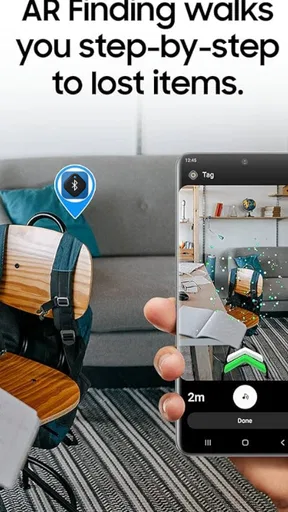
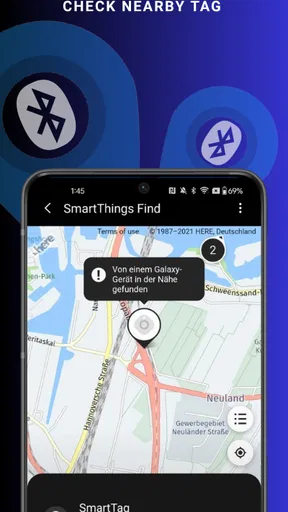
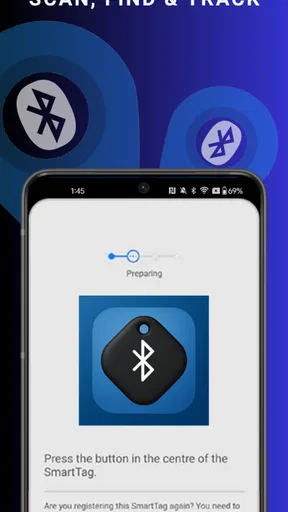
Our Review of Samsung SmartTag
 Analysis by Appyee
I approached Samsung SmartTag as a practical companion for people who already use Samsung Galaxy SmartTag devices and want a straightforward way to work with them. The app sits in the Libraries & Demo category, which is a slightly unusual home for a tag-related utility, but its purpose is easy to understand: it is built around Samsung’s SmartTag ecosystem rather than trying to be a general-purpose item finder for every phone and tracker.
My first impression is that this is a focused tool, not an app I would install casually just to browse around. Its value depends heavily on whether you own a compatible SmartTag and use a Samsung Galaxy device. If that describes you, the app can fit naturally into a routine involving keys, bags, luggage, or other belongings. If you use another brand of tracker, or if you want one app that handles several competing ecosystems, I would look elsewhere before committing time to it.
What the app feels like in everyday use
The developer is Boss Inc, and the app is free with an Everyone content rating. It has reached over ten thousand installs, while its average rating is 3.1 from around 160 ratings. I read that combination as a sign to keep expectations practical: there is enough interest for the app to be useful to a real group of people, but the rating does not suggest a universally smooth experience.
The current version is 18.0.0, and it runs on Android 7.0 or later. That minimum requirement is helpful for people with older phones, although compatibility with the operating system alone should not be confused with guaranteed compatibility with every SmartTag setup. The important question is whether the phone, tag, Samsung account environment, and app behave together as expected.
In terms of speed, a tag utility should feel quiet and responsive rather than busy. I would not judge it by the same standards as a social app or a game. The key moments are opening the app, seeing the relevant tag information, starting an action, and getting a clear response when a tag is nearby or needs attention. A simple interface has an advantage here because fewer layers usually mean fewer places for a user to get lost.
That simplicity also creates a trade-off. Someone expecting a broad dashboard with extensive customization may find the experience limited. The app’s identity is tied to Samsung SmartTag use, so its usefulness is concentrated rather than expansive. I prefer that focus when I am trying to locate or manage a tagged item, but I would not choose it as a general library of device tools.
How quickly it should fit into a routine
The best everyday scenario is a familiar one: I leave home, notice that my keys are not in my pocket, and use the SmartTag setup rather than searching every room from memory. In that situation, the app matters because it reduces the number of decisions between noticing a problem and taking action. The practical tip is to configure the tag before an emergency, while the item is in hand and the phone is connected normally. Waiting until luggage is already missing is the worst time to discover that the setup is incomplete.
A second useful workflow is preparing for travel. I would attach a compatible tag to a suitcase, open the app before leaving, and make sure I know which tag corresponds to which item. Clear naming is more valuable than it sounds. “Black suitcase” is easier to recognize under pressure than a vague label or a default device name, especially when several belongings are tagged.
For a family member who is not comfortable with technology, the app may still be approachable if the initial pairing and naming are handled carefully. I would not hand over an unconfigured tag and expect the person to understand it immediately. The real strength is not that it removes all setup work; it is that, once the relationship between phone, tag, and item is clear, the daily purpose is easy to explain.
What happens during heavier use
Heavy use for this app is not the same as leaving a game running for a long session. It is more likely to mean checking several tagged belongings in succession, moving between rooms, preparing multiple bags, or repeatedly trying to reconnect after a tag has been out of range. Those moments expose whether the app communicates its state clearly.
I would approach multiple-tag use with a little organization. Give each tag a distinct name, keep similar items from sharing confusing labels, and test the setup in the places where you expect to use it. A tag attached to a keyring is used differently from one placed in luggage, and a workflow that feels obvious in the living room may be less convenient in a crowded station or unfamiliar building.
The most important performance expectation is not flashy speed but predictable feedback. If an action takes a moment, I want the app to make it clear that it is working rather than leaving me wondering whether the tap registered. If a tag is unavailable, the useful response is an understandable status rather than repeated guessing. I would treat any delay as a reason to check distance, phone connectivity, and the tag’s situation before assuming the app itself has failed.
There is also a resource trade-off worth considering. A tracker companion is most useful when it can participate in the background of daily life, but background activity can affect battery behavior on some phones. I cannot responsibly promise a particular battery impact for every device, because Android settings, phone age, and usage patterns vary. My practical advice is to watch the phone’s battery screen after installing and adjust system restrictions only if they interfere with the behavior you actually need.
That advice cuts both ways. Aggressive battery saving may reduce unwanted background work, but it can also make a tracking workflow less dependable. Leaving every setting unrestricted may be unnecessary. I would begin with the normal system configuration, test the app with a tag, and change one setting at a time only when there is a clear reason.
Reliability depends on more than the app
SmartTag reliability is an ecosystem question. The app is one part of the chain, alongside the phone, the tag, the wireless connection, the operating system, and the environment around the item. Walls, distance, crowded locations, and a tag that has been placed inside a thick case can all change the experience. That means a disappointing result does not automatically identify the app as the cause.
When something seems wrong, I would use a calm recovery sequence. First, confirm that the phone is the one normally associated with the tag. Next, check that the tag has not been moved, covered, or left far outside the expected area. Then close and reopen the app if its screen appears stuck, and try again from a place where the phone and tag are close together. This is less dramatic than immediately reinstalling everything, and it preserves a clearer idea of what changed.
If the app repeatedly behaves inconsistently, I would avoid relying on it as the only protection for valuable luggage or essential items. A tracker can reduce search time, but it is not a substitute for labels, contact details, sensible packing, or paying attention to belongings. That is especially important when the item is moving through airports, hotels, or public transport, where recovery depends on people and circumstances as much as software.
One non-obvious advantage of testing at home is that it teaches you the limits of your own setup before those limits matter. I would place the tagged item in several ordinary locations, try the workflow from different rooms, and note how the app communicates changes. This creates a personal baseline. Later, if the experience is different, I can tell whether the problem is distance, the environment, the phone, or the tag rather than treating every delay as random.
Phone and platform constraints to keep in mind
The stated minimum operating system is Android 7.0, so people with older compatible phones may be able to use it without upgrading immediately. Still, an old operating system can bring practical constraints even when an app installs successfully. Bluetooth behavior, system power management, Samsung services, and account handling can differ between phones. I would therefore test the complete SmartTag workflow on the actual phone that will be carried every day, not just on a spare device used for setup.
The Samsung connection is the central constraint. The store summary describes the app as working with Samsung Galaxy SmartTag and other smart tags, but I would not interpret that as a promise that every tracker from every brand will behave identically. If you already own a competing tag, its own companion app may offer a more dependable experience because it is designed around that manufacturer’s hardware and account system.
This is also why iPhone users should be cautious about assuming that the app is a universal answer. The stated platform requirement is Android, and the product is presented around Samsung Galaxy SmartTag use. Someone in a mixed household may be better served by choosing a tracker ecosystem that supports all the phones involved rather than buying hardware first and discovering the platform mismatch later.
Storage and processing demands are not the main reason to choose or reject this app. It is a utility rather than a media-heavy application, so I would expect its everyday burden to be modest compared with games, video editors, or large libraries. The more meaningful resource question is whether the phone can maintain the connections and background behavior needed for your use case without excessive battery restrictions.
Who should use it, and who should skip it
I would recommend trying it if you own a Samsung Galaxy SmartTag, use an Android phone that meets the operating-system requirement, and want a dedicated way to work with tagged belongings. It makes the most sense for keys, backpacks, luggage, and household items that regularly disappear into predictable places. The free price also makes experimentation easier, provided you already have compatible hardware.
I would be more hesitant if you have only one phone and it is not part of the Samsung ecosystem, if your household uses several phone platforms, or if you need a tracker service that treats different brands equally. In those cases, the usual alternative is the app made for the tracker you already own, or a cross-platform ecosystem selected specifically for mixed devices. A broader alternative may be less tightly connected to Samsung hardware but more convenient for a household with varied phones.
I would also skip it as a solution to a problem it cannot solve: preventing theft or guaranteeing recovery. The app can support a search process, but it cannot turn a misplaced item into a secure item. If your main concern is high-value equipment, combine tracking with physical security and clear ownership information rather than judging the app as a complete protection system.
For people who dislike troubleshooting, the decision depends on where the friction appears. The initial setup may be worth it if the tag will be used often, because repeated searches become easier to organize. But if you rarely misplace anything and do not already own a compatible SmartTag, buying into an ecosystem solely for occasional convenience may not be worthwhile. The app is most convincing when it supports a habit, not when it is installed and forgotten.
Small habits that improve the experience
My first tip is to name tags by both object and context. “Work keys” or “carry-on suitcase” is more useful than a generic name, and it reduces the risk of selecting the wrong device when several tags are nearby. My second tip is to test the tag after attaching it. Placement can affect how easy it is to recognize, hear, or reach, and a tag hidden deep inside an item may be harder to work with than one secured in an accessible pocket.
My third tip is to avoid making a last-minute change before travel. Install the app, pair the tag, identify the item, and practice the basic action while you still have time to correct mistakes. This also gives you a chance to notice whether your phone’s battery controls interfere with the behavior you expect.
A fourth useful habit is to keep the phone itself ready. A tracking app cannot help much if the phone is nearly out of power, Bluetooth is disabled, or the user has forgotten which account and device were used during setup. I would treat the phone as part of the tracking equipment and include it in a quick check before a trip or a busy day.
Recovery is easier when you change only one thing at a time. If the app does not respond, do not simultaneously reinstall it, reset the tag, change several battery settings, and switch phones. Start nearby, reopen the app, and verify the basic connection. Then move to more involved steps if necessary. This approach takes a little patience but gives you a much better chance of identifying the actual cause.
My performance verdict
Samsung SmartTag is a specialized free app whose performance should be judged by useful responses and dependable recovery rather than by entertainment-style speed. Its strongest case is a Samsung Galaxy SmartTag owner who wants a focused companion for everyday belongings. The experience can be practical when the phone, tag, and account are prepared in advance, and the app’s narrow purpose keeps the decision-making relatively clear.
The rating of 3.1, based on around 160 ratings and 17 reviews, makes me recommend a test-first approach rather than blind confidence. Install it on the phone you will actually carry, configure one tag, and try the complete workflow in your home and outside it. That will reveal more about suitability than a quick glance at the app screen.
Version 18.0.0 and support for Android 7.0 or later make the entry point accessible to a broad range of Android users, but the real boundary is hardware and ecosystem fit. I would choose it for a Samsung-centered setup with clearly named tags and realistic expectations about distance, battery behavior, and recovery. I would choose a different tracker app when cross-platform support, broad brand compatibility, or a more mature alternative matters more than staying close to Samsung hardware.
My final view is cautiously positive: useful when it matches your SmartTag setup, but not a universal item-finding solution. It earns a place on the phone of the right user, especially someone willing to configure tags before needing them. For everyone else, the better performance decision may be choosing a tracking ecosystem first and its companion app second.
Privacy and Permissions
See what permissions an app requests and how it handles your data.
- Location
- approximate location (network-based), precise location (GPS and network-based)
- Other
- view network connections, pair with Bluetooth devices, access Bluetooth settings, full network access, control vibration, prevent device from sleeping, Google Play license check
Verdict
Strengths of Samsung SmartTag
- Works reliably with Samsung Galaxy phones and tablets.
- Uses nearby Galaxy devices to help locate an out-of-range tag.
- Compact design is easy to attach to keys, bags, or pet collars.
- SmartThings integration enables location history and device management.
- Can trigger compatible SmartThings devices with a button press.
Limitations of Samsung SmartTag
- Requires a Samsung account and Galaxy device for full functionality.
- Limited usefulness for iPhone and non-Samsung Android users.
- Nearby-device locating depends on Galaxy users being in the area.
- Battery life varies with settings, usage, and Bluetooth connectivity.
- Some features and models may require newer Galaxy hardware.
Other Releases by Boss Inc
View All
MirrorLink App for Car
Libraries & Demo4.3
Similar Picks in This Category
View All
PGT: GFX, Launcher & Optimizer
Trilokia Inc.4.5

AusweisApp Bund
Governikus Service GmbH3.7

Cardboard
Google LLC3.2

Gamers GLTool with Game Tuner
Trilokia Inc.4.5

Multi Web Chat - Read Secretly
World Scan & Cleaner3.8

App Cloner Premium & Add-ons
App Listo1.9
Frequently Asked Questions
What is Samsung SmartTag and what does it do?
Samsung SmartTag is a small Bluetooth tracker designed to help you locate everyday items such as keys, bags, wallets, luggage, or pet collars. After pairing it with a compatible Samsung Galaxy phone through the SmartThings Find service, you can view the tag’s last detected location, make it play a sound, and use nearby search features to find it more easily.
Which phones are compatible with Samsung SmartTag?
Samsung SmartTag is primarily intended for Samsung Galaxy smartphones and tablets running a compatible version of Android with Bluetooth enabled. Some features may require a Samsung account, the SmartThings app, and location permissions. Compatibility can vary by SmartTag model, phone, and software version, so checking the requirements in the Galaxy Store or Google Play before downloading is recommended.
Does Samsung SmartTag work without an internet connection?
The tag can communicate with your phone over Bluetooth when you are nearby, but several functions depend on internet access and Samsung’s Galaxy Find Network. If the tag is out of Bluetooth range, its location may be updated when participating Galaxy devices detect it. Results depend on nearby devices, network availability, permissions, battery status, and the privacy settings of the people involved.
How accurate is Samsung SmartTag when locating an item?
Samsung SmartTag can provide a useful approximate location, but it should not be treated as a guaranteed real-time GPS tracker. Bluetooth range, walls, buildings, interference, and the surrounding environment affect accuracy. When you are close to the tag, supported models and compatible Galaxy phones may offer more precise nearby guidance, while distant locations generally depend on network-based detection.
Does Samsung SmartTag require a subscription, and how long does its battery last?
Samsung SmartTag does not normally require a monthly subscription for its standard locating features, although a Samsung account and the SmartThings Find service are required. Battery life depends on the model, usage, temperature, and settings. Many versions use a replaceable coin-cell battery, but users should monitor battery warnings and replace the battery promptly to avoid losing tracking capability.
